Commercial PCAP Touch Screen Monitor with Optional Windows OPS PC
Create a responsive interactive display for retail, reception, education,
visitor information, self-service and bespoke kiosk applications with our
commercial PCAP touch screen monitor.
Available in five sizes from 22 inches to 55 inches, each display combines
responsive 10-point projected capacitive touch technology with a bright
commercial-grade IPS panel, toughened edge-to-edge glass and a robust
enclosed housing suitable for continuous professional use.
The screen can be purchased as a standalone touch monitor for connection to
your own computer, or configured with an optional OPS slot-in PC to create
a neat, self-contained Windows touch screen. Windows 11 Professional can
also be supplied pre-installed when an OPS PC is selected.
The Windows-compatible version is our most popular option because it gives
you the flexibility to run a wide range of conventional desktop,
commercial and bespoke Windows applications.
Key Features
✓ Responsive 10-point PCAP touch
✓ Five screen sizes from 22" to 55"
✓ Full HD or 4K Ultra HD resolution
✓ Bright 500cd/m² IPS panel
✓ Designed for 24/7 commercial use
✓ Optional integrated Windows OPS PC
✓ Windows 11 Professional available
✓ Connect your own PC using HDMI and USB
✓ Adjustable open-frame bracket included
✓ Landscape or portrait installation
✓ Integrated stereo speakers
✓ Three-year commercial display warranty
Responsive 10-Point PCAP Touch
Projected capacitive, or PCAP, technology delivers the responsive
and intuitive touch experience associated with modern smartphones
and tablets.
A sensor grid positioned beneath the protective glass detects the
exact coordinates of each touch. Unlike some alternative touch
technologies, PCAP is not adversely affected by dust or small
amounts of surface debris and provides excellent optical clarity.
Up to ten simultaneous touch points allow users to tap, swipe, drag,
rotate and pinch-to-zoom. Multiple users can also interact with the
display at the same time where this is supported by the chosen
software.
Built for Commercial Environments
Unlike a domestic television, tablet or standard office monitor, these
displays are engineered for professional installations in public and
customer-facing environments.
The approximately 3mm-thick toughened glass has a minimum 7H hardness
rating, while the robust metal enclosure helps protect the LCD panel
and internal components from accidental damage.
A special oleophobic surface treatment makes the glass more resistant
to oily fingerprint residue and moisture. It also reduces surface
friction, helping touch gestures feel smoother without using an etched
finish that could reduce optical clarity.
Commercial-grade components and energy-efficient LED backlighting allow
the screens to operate continuously, 24 hours a day. The panel and
backlight are designed to provide a service life of more than 70,000
hours.
Bright 500cd/m² Commercial IPS Display
With a brightness of 500cd/m², the screen remains clear and vibrant in
brightly illuminated indoor locations such as retail stores, reception
areas, showrooms, schools, museums and corporate buildings.
Commercial IPS panel technology delivers accurate colour reproduction,
excellent image quality and a wide 178-degree viewing angle, with no
significant fall-off in colour accuracy when viewed from the side.
The display can be installed in either landscape or portrait orientation.
The 22-inch and 32-inch models provide Full HD resolution, while the
43-inch, 50-inch and 55-inch screens offer 4K Ultra HD resolution.
Two integrated slimline speakers allow compatible applications, videos and
presentations to include audio without requiring separate external
speakers.
Contemporary Tablet-Inspired Styling
Edge-to-edge glass, rounded corners, a slim black border and an
attractive aluminium surround give the display a clean,
tablet-inspired appearance.
The distinctive concave profile around the edge creates a
refined modern finish while also making the monitor easier to
handle during installation.
Although the screen has a stylish appearance, it remains a
complete commercial monitor with a durable enclosed rear
housing rather than an exposed LCD panel.
Open-Frame Design for Kiosk Integration
Every display is supplied with an underside open-frame mounting
bracket, making it suitable for integration into kiosks, counters,
tables, cabinets and other bespoke furniture.
The bracket provides micro-adjustment in three directions, allowing
the monitor to be aligned accurately and positioned flush with the
surrounding surface. This is particularly useful for kiosk
manufacturers, OEMs and system integrators.
As the monitor also has a complete enclosed housing, it can be used
without a kiosk enclosure and mounted directly onto a compatible
wall bracket, floor stand, trolley, ceiling mount or table stand.
Use Your Own PC or Choose an Integrated OPS Computer
You do not have to purchase a computer from us. If you already have a
suitable Windows PC, mini PC or media player, it can be connected to the
screen using HDMI for the picture and sound, together with USB for the
touch functionality.
The display then operates as a commercial touch monitor. Touching the
screen controls the cursor and compatible software in much the same way
as using a mouse.
Alternatively, select one of our optional OPS slot-in computers to
create a neat all-in-one Windows touch screen. The computer slides
directly into the dedicated compartment at the rear of the display,
with power, video, audio and touch connections made internally.
This eliminates the need to mount a separate computer behind the screen
and avoids external HDMI and touch cables between the monitor and PC.
Optional Integrated Windows PC
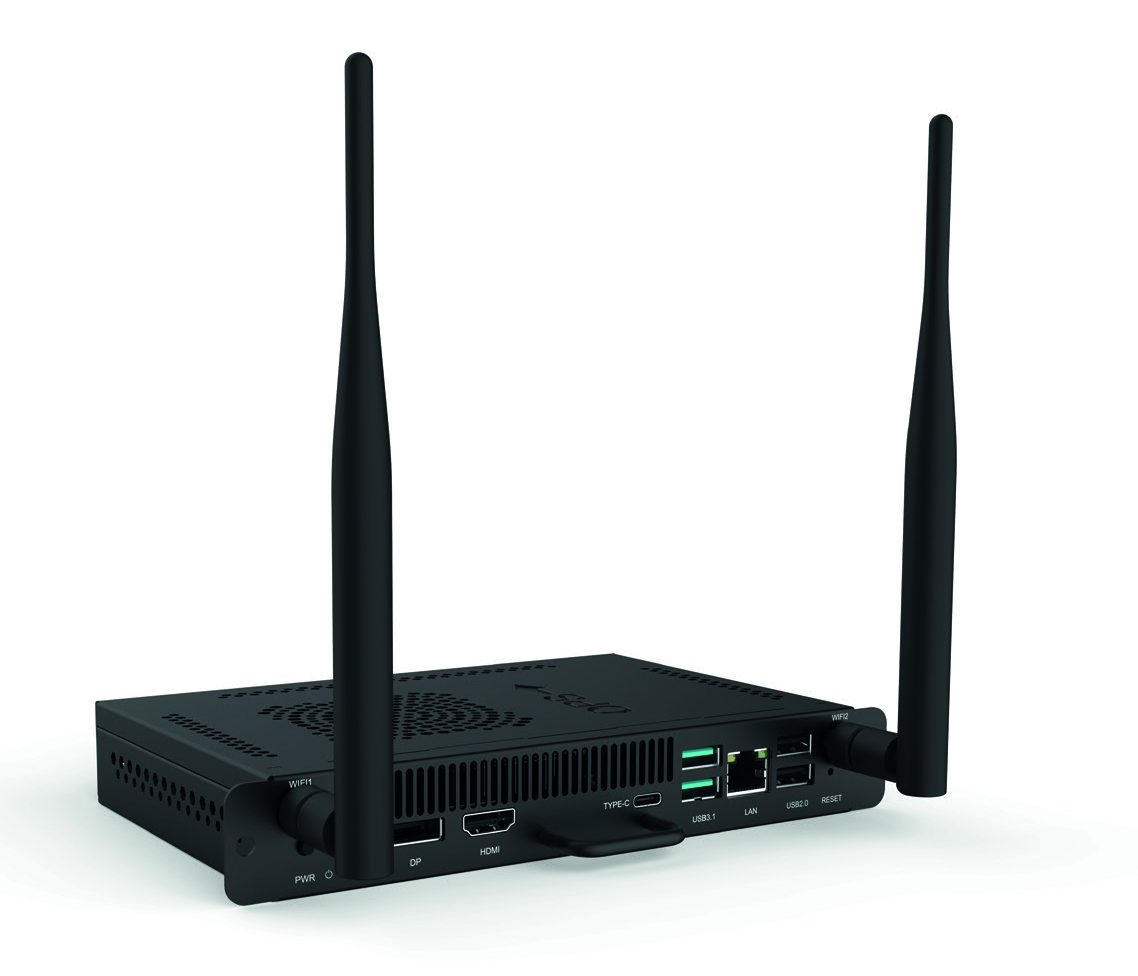
An OPS, or Open Pluggable Specification, PC is a compact computer
designed specifically for integration with compatible commercial
displays.
Once inserted into the rear expansion slot, the monitor and computer
operate as one integrated unit. The PC can also be secured with a
hex security fixing to help prevent accidental removal or
unauthorised access in public environments.
Choose the display without a PC if you already have suitable
hardware, or add either our Essential or Premium OPS PC when
ordering.
How Is the OPS PC Installed?
The OPS computer simply slides into the dedicated slot on the
rear of the touch screen. There is no need to connect separate
power, HDMI or USB cables between the PC and the display.
When a PC is selected, its Wi-Fi and Bluetooth aerials remain
accessible at the rear and can be rotated outwards after
installation.
The OPS PC is hidden from view during normal use, creating a
clean, secure and self-contained interactive display.
Choose the Right OPS PC
We offer two OPS PC specifications. Both use the same compact
slot-in format, but the internal processor, storage capacity and
graphics performance differ.
The Essential OPS PC is suitable for general commercial
applications, including reception systems, interactive directories,
digital catalogues, web-based applications and visitor management.
The Premium OPS PC uses a newer 12th-generation Intel Core i5
processor and offers additional storage and stronger graphics
performance for more demanding applications.
Windows 11 Professional can be supplied pre-installed with either
PC. Full specification sheets for both options are available under
the Downloads tab.
Essential and Premium OPS PC Comparison
Specification
Essential OPS PC – OPS-ES1
Premium OPS PC – OPS-P6
Processor
Intel Core i5-8300H
12th Generation Intel Core i5-12450H
Processor cores
4 cores / 8 threads
8 cores / 12 threads
Memory
8GB DDR4
8GB DDR4 3200MHz
Storage
128GB M.2 SSD
256GB M.2 SSD
Graphics
Integrated Intel graphics
Intel Iris Xe graphics
Maximum resolution
Up to 4K
Up to 4K
Recommended for
General business software, browsers, interactive catalogues,
visitor management, directories and reception systems
Demanding applications, multitasking, graphics-intensive
software, real-time rendering and 3D content
Operating system
Optional Windows 11 Professional
Optional Windows 11 Professional
Five Screen Sizes
Choose from five screen sizes to suit everything from compact counter
installations and room-booking displays through to large-format
wall-mounted interactive screens.
Screen Size
Resolution
Brightness
Typical Applications
22 inch
1920 × 1080 Full HD
500cd/m²
Compact kiosks, counter installations and room booking
32 inch
1920 × 1080 Full HD
500cd/m²
Reception areas, retail kiosks and directories
43 inch
3840 × 2160 4K Ultra HD
500cd/m²
Retail displays, education and interactive presentations
50 inch
3840 × 2160 4K Ultra HD
500cd/m²
Showrooms, public information and large directories
55 inch
3840 × 2160 4K Ultra HD
500cd/m²
High-impact interactive displays and large public spaces
Full technical information, including overall dimensions, display area,
VESA mounting pattern, power consumption and weight, is available in
the downloadable specification sheets under the Downloads tab.
Typical Applications
The display can operate compatible software supplied by you or a third-party
developer, making it suitable for a wide variety of interactive commercial
projects.
Interactive retail catalogues
Visitor management systems
Reception information points
Self-service kiosks
Meeting room booking
Interactive wayfinding
Museums and visitor attractions
Schools and universities
Product configurators
Corporate presentations
Industrial control interfaces
Hospitality and leisure
Mounting Options
The adjustable open-frame mounting bracket is included as standard.
An optional landscape wall bracket can also be selected when ordering.
Alternative mounting solutions, including floor stands, trolleys,
ceiling mounts and table stands, may also be available depending on
your chosen screen size and installation requirements.
Any third-party mounting system should be checked carefully to ensure
that it is suitable for the screen's dimensions, weight and VESA
mounting pattern.
What Is Included?
Commercial PCAP touch screen monitor
Adjustable open-frame mounting bracket
Remote control
Power cable
USB touch cable
User manual
If an OPS PC is selected, the computer and its associated Wi-Fi and
Bluetooth aerials will also be supplied.
A landscape wall bracket and Windows 11 Professional licence are optional
extras and must be selected when ordering if required.
Windows 11 Professional
Windows 11 Professional is available as an optional licence when
purchasing either the Essential or Premium OPS PC. When selected, the
operating system will be installed before the equipment is dispatched.
The display and computer do not include bespoke touchscreen
applications, kiosk software, content management software or
interactive content unless specifically stated. You are responsible
for ensuring that your chosen software is compatible with Windows 11
and suitable for your intended application.
Windows or Android Touch Screen?
This Windows-compatible model is our most popular option because it gives
you the flexibility to connect your own computer or add an integrated OPS
PC and run compatible Windows applications.
It is generally the better choice for bespoke software, visitor management,
product configurators, business applications, database-driven systems and
other projects requiring a conventional desktop operating system.
Android displays can be useful for showing websites, running compatible
Android applications and using our optional cloud-based Touch CMS platform.
However, they cannot run conventional Windows desktop software and may
therefore be more restrictive for specialist commercial applications.
If you are unsure which platform is most suitable for your project, please
contact us before ordering.
Commercial Warranty and Support
The PCAP touch screen monitor is supplied with a three-year commercial
warranty and lifetime technical support.
The Essential and Premium OPS computers are supplied with a five-year
warranty when purchased together with a compatible interactive touch
screen display.
Frequently Asked Questions
Do I have to purchase an OPS PC?
No. The screen can be supplied as a standalone touch monitor. Connect
your own compatible computer using HDMI for the picture and USB for the
touch functionality.
What is an OPS PC?
An OPS PC is a compact computer that slides directly into the rear of
a compatible commercial display. It creates a clean all-in-one Windows
touch screen without requiring an externally mounted computer.
Can I install my own OPS PC?
You may be able to install your own OPS PC provided it is fully
compatible with the display and the OPS interface. We recommend
confirming compatibility before ordering.
Does the display include Windows?
Windows is only included when Windows 11 Professional is selected as an
option alongside an Essential or Premium OPS PC.
Can I use the touch screen without Windows?
Yes. The screen can be connected to other compatible computers or media
devices, provided they support HDMI video output and USB touch input.
The functionality available will depend on the connected hardware,
operating system and software.
Can the screen be installed inside a kiosk?
Yes. An adjustable open-frame mounting bracket is supplied as standard,
allowing the display to be recessed into kiosks, counters, tables,
cabinets and bespoke furniture.
Can it also be wall mounted?
Yes. The complete enclosed housing allows the screen to be mounted using
a compatible VESA wall bracket. An optional landscape wall bracket is
available when ordering.
Can the screen be installed in portrait orientation?
Yes. The display is suitable for either landscape or portrait
installation, subject to the chosen mounting solution and software.
Is the screen suitable for continuous use?
Yes. It is a commercial-grade display designed for continuous 24/7
operation.
Which OPS PC should I choose?
The Essential OPS PC is suitable for most general retail, reception,
catalogue, visitor-management and browser-based applications. The
Premium OPS PC is recommended for more demanding software,
graphics-intensive applications, multitasking and real-time rendering.
Can I install my own software?
Yes. When connected to a suitable computer, the display can operate
compatible software of your choice. It is your responsibility to check
that the application is suitable for the chosen operating system and
PC specification.
Do you also supply an Android version?
Yes. Our
Android PCAP Touch Screen Displays
have Android built in and are suitable for compatible Android apps,
websites and our optional Touch CMS platform.
Need Help Choosing the Right Interactive Display?
Whether you are integrating the screen into a self-service kiosk,
reception desk, retail environment or bespoke interactive project, our
team can help you choose the most appropriate configuration.
We can advise on screen size, mounting, whether an OPS PC is required
and which computer specification is best suited to your software.
Please contact our sales team if you have any questions before
ordering.